Monday, 3 August 2020

Historica App Source Code

"Historica App "


Aim :

Mobile app for increasing awareness among local residents as well as at national level, leading to an increase in ownership among locals and stimulus to tourism


Skills :

Android Studio , xml ,java

Features :

Historica is the all in-one travel guide or adviser application. App consists mainly 4 sections

A) Community Post  :- This Section consist the history of monuments which we collect from various sources.

(B) Upload Section    :- Only registered and verified users can upload to the database.

(C) Traveler Guide  :-Where we provide all information about monument.

(D) Chatting Room   :- Where all users can chat with each other and ask their queries.


Source Code:


Link

App landing Page static website (HTML , CSS , JS)


"App Landing Page"

It is a static type of web-page used to describe functions of Mobile applications. It is typically known as the “home page” of the mobile app, presenting a simple and clear interface that is a static type of web-page used to describe functions of Mobile applications. It is typically known as the “home page” of the mobile app, presenting a simple and clear interface that introduces the customer to what the app is all about.Sometimes the term 'landing page' is meant as a destination page - i.e., any page where website visitors land when they first reach your site.

A landing page includes several elements:

  • A page completely focused on the offer. Even website navigation gets removed so as not to distract from the offer.

  • A compelling headline and space to explain how the offer delivers sufficient value that a visitor would agree to leave an email address and other information. Included bullets to detail benefits.

  • An image showing what the offer looks like.

  • A form for capturing at minimum an email address, and as relevant more information (name, company name, persona qualification question, business questions...)

  • A means for delivering the offer - aka the 'thank you' page

So, today we are here with App Landing Page  script for you, so that  you can use it anywhere online as you want with any loyalties.

Saturday, 1 August 2020

Emergency system with IOT || Android app over cloud Service (Firebase)

Firebase || Android || IOT project


Aim :


Make an android app which is connected by a node-mcu(esp8266) module device to alert user for any emergency....

Tools Required :


  • Node MCU (Hardware)

  • Android studio (for appdevelopment)

  • Firebase Account (for backend)

Thesis :


We will connect our android app with Firebase and nodemcu will also connected to Firebase....
Whenever there is emergency user will click help button in app and then NODE-mcu will start triggering our LED or Sound senor which is connected over WiFi ....
This will help us to overcome any local area problem and connectivity is world world (over WAN)...


Start :


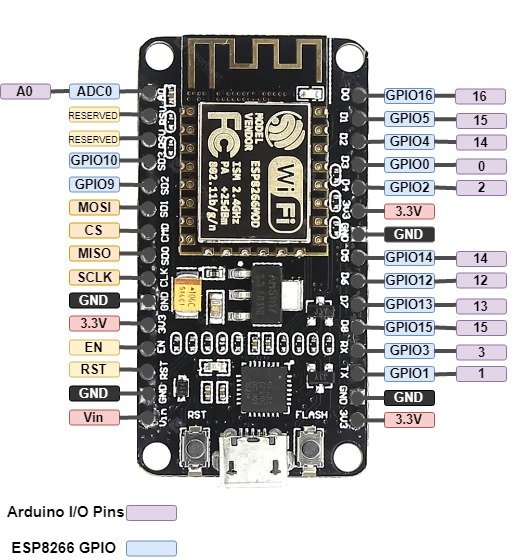
Node-MCU is iot board used to make cool stuff's with IOT concept's

NODE-MCU look like this..


So moving forward to our project we will divide our project in 2 steps....


  1. NODE MCU part
  2. Android app part

Part 1:


Code for NODE-MCU


Connection Diagram


Part 2:


Code for Android-App


That's it....We made our IOT app over cloud service.

Thursday, 30 July 2020

Weather Forecasting Project using Selenium Framework || Python

AIM :

This project used Selenium framework to fetch Weather forecast detail of a particular city with some predefined definition to handle some errors and give output in console form to user with a picture graph...

TECH STACK :

CODE :